Selasa, 25 Januari 2011

Designer Religion

'The Book came in seven weighty folio volumes with more than 3,000 pages and 250 plates of engravings covering all the religions known to Europeans in the early 1700s.

It was called 'Cérémonies et Coutumes Religieuses de tous les Peuples du Monde' [Religious Ceremonies and Customs of all the peoples of the world].

Published between 1723 and 1737, all its volumes bore the name of Bernard Picart, the most famous engraver of the 18th century after Hogarth, on whom Picart in fact had a direct influence. 'Religious Ceremonies' was published by Jean Frederic Bernard, who was also the unsung compiler, editor and author of this pioneering work on the world's religions.

The volumes began with Judaism and Catholicism, moved on to the Americas and India, then to Asia and Africa, only to return to the familiar, to the many forms of Protestantism, before finally tackling Islam. No other work before then had ever attempted, in word and image, such a grand sweep of human religions.

'Religious ceremonies' marked a major turning point in European attitudes toward religious belief and hence the sacred. It sowed the radical idea that religions could be compared on equal terms, and therefore that all religions were equally worthy of respect -- and criticism.' [source]


Tableau des Principales Religions du Monde

FRONTISPIECE: 'Representation of the main religions of the world; landscape with, in the foreground, group of Muslim men sitting around another one, standing and preaching; in the middleground, crowd gathered around the Roman Church, represented by a female figure wearing a tiara and holding an open book; she tramples underfoot a rabbi unrolling parchment with hebraic inscription, and a female figure in amour holding a Victory, representing the Roman Empire; an old woman with crown of thorns, personifying Superstition, grabs the Victory; on the left Christian Religion personified stands under a tree, with an open Bible a Franciscan monk is trying to close; in front of them, a priest baptizing a woman; in the background, scenes of pagan cults..' [source]


Les Free Massons
Les Free Massons

This curious print was engraved by I.F. after a drawing by Louis Fabrice du Bourg from information supplied by John Pine, a Masonic Lodge member and student of the book's overall illustration designer, Bernard Picart. That convoluted background seems appropriate not only because of the esoteric nature of Freemasonry itself, but because the central portrait high on the wall - Sir Richard Steele - has been the subject of speculative analysis since the print was first published.

Research conducted over the last two hundred years has failed to prove whether or not Steele was in fact a member of a Masonic Lodge. His great claim to fame in the history of Freemasonry appears to be a couple of oblique references to the fraternity made in articles he wrote for the Tatler newspaper, which he had co-founded. For instance, from 1709: 'You see these accost each other with effeminate airs, they have their signs and tokens like Freemasons'. This may well have been the first ever mention of the Freemasons in the British press.

For general background see:
'It represents in the foreground the Worshipful Master, his Wardens and Brethren, all in the costume of the early part of the last century; beyond them stretches a table in the shape of a square, and behind this table rises a high panelled wainscoting. The panel is divided into 129 smaller squares, on each of which appears a number, the copy of a tavern sign, and the name of the tavern in question. . . . . The plate is valuable as showing us the Masonic costume of the period, and curious as suggesting that Sir Richard Steele must have been a Freemason. It is indeed our only evidence on that point as, although many expressions in his writings might be held to confirm such a view, we have no record in lodge minutes, or members' lists, that such was the case.'
[Bro. Speth, 1800s as quoth in 1919]


Annee de Mexiquains (7)
Siècle des Mexiquains

'A circular disc representing the various years and months within the Mexican Century [siècle]. The serpent that surrounds the circle marks out four different sections with its coils, and divides the circle into an upside-down compass. The North points down and is represented by the spearhead: Tecpatl; East is represented by a Cane: Acatl; West by a House: Cagli; and South by a rabbit: Tochtlila. There are 16 hieroglyphics equally distributed between each four sections.' [source]

The illustration design is {'said to have been'} copied/adapted from one produced by Theodore de Bry in the late 16th century. It appears to be a faithful depiction of an Aztec calendar stone, fairly similar to artifacts uncovered in 1790 [previously]


Deuil des Femmes Greques a Rama + Bapteme des Grecs dans le Jourdain (V. 3)
Deuil des Femmes Greques à Rama
&
Baptême des Grecs dans le Jourdain

Greek women mourning at (?)Rama
&
Greek baptism in the river Jordan

(I confess to being confused by both the wording and imagery here. My first inclination is to wonder if 'Greek' is being misapplied; otherwise is it used as a stand-in/euphemism for 'little known peoples' or.. ?)


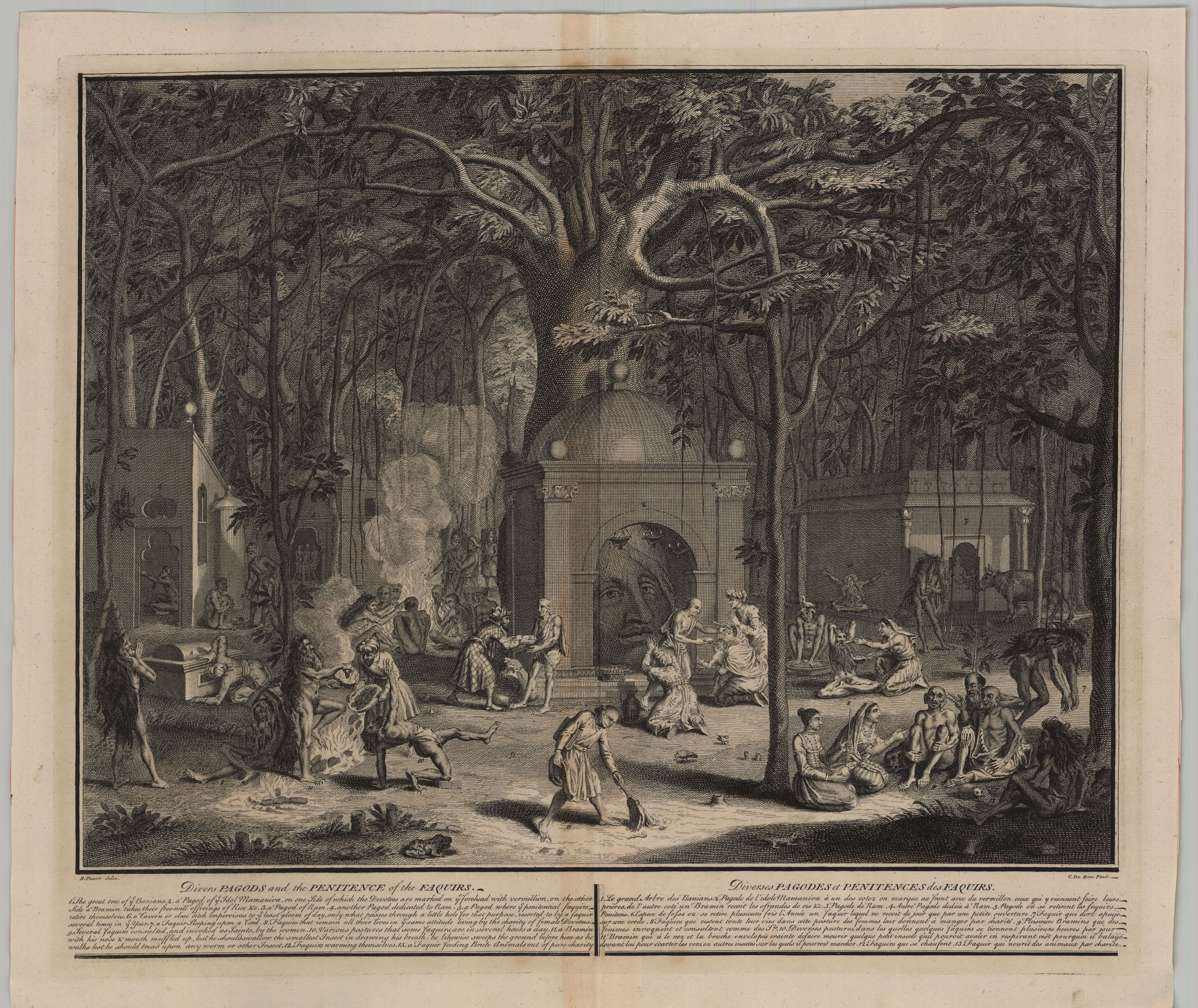
Diverses Pagodes ou Penitences des Faquirs (V. 6)
Diverses Pagodes où Penitences des Faquirs

Indian fakirs (or sadhus*) perform penance rituals (physical contortion, austerity measures etc) at the site of various pagodas or temples (my interpretation)

Addit: immediately prior to posting this entry, I came across another, much larger version (here) of this illustration which comes from Columbia University Professor Frances Pritchett's page on the Picard illustrations.


Ceremonie Nuptiale du Japon + Ceremonie Funebre du Japon (V 6)
Ceremonie Nuptiale du Japon
&
Ceremonie Funebre du Japon

Japanese wedding and funeral ceremonies


Idoles Chinois + Les Dieux des Chinois
Idoles Chinois
&
Les Dieux des Chinois

Chinese idols and Gods

Picard notes in the engravings that his source for the illustration was the Jesuits and that one of the pictures (at least!) was copied from Athanasius Kircher's 'China Monumentis' [previously]


Dgi-Guerdgi Albanois qui porte au Bezestein des Foyes de Mouton pour nourrir les Chats (V. 5)
Dgi-Guerdgi Albanois qui porte au Bezestein
des Foyes de Mouton pour nourrir les Chats


The Albanian Dgi-Guerdgi feeding cats in the
bazaar in Constantinople with sheep liver

One supposes this to be more of a cultural than ceremonial or religious example. It appears to have been copied from an engraving that appeared in the 1705 book called 'Recueil de cent Estampes Representant differentes Nations du Levant..' [see colour version and NYPL has all of the delightfully eccentric illustrations from that book] after the original painting by Jean-Baptiste Vanmour.


La Danse des Deruis (V. 5)
La Danse des Deruis

The whirling Dervish - a mystical Sufi practice (posted previously), commonly performed in a Mevlevi Sema ceremony in Turkey. This illustration also derives from the 1705 '..Levant..' book mentioned above.


La Penitence des Juifs Allemans dans leur Synagogue AND Pretre des Gaures
Penitence des Juiſs Allemans dans leur Synagogue
&
Grand Prêtre des Gaures ou Perses devant
le feu ayant à la main son rituel.
Trois Différentes Têtes de prêtres gaures
avec la mitre et la bouche couverte

-(these two images are not related)-

Penitence (penance?) of the German Jews in their Synagogue
&
Grand Priest performing a ritual and three different types of priest head covering. Perhaps related to Persians. [Anyone have an idea about who the Gaur(e)s are?? nb. ----> UPDATE: see first comment below]


La Dedicace de la Sinagogue de Juifs Portugais a Amsterdam
La Dedicace de la Sinagogue de Juiſs Portugais a Amsterdam

The dedication of the Portuguese Synagogue in Amsterdam
'Sephardic Jews fleeing Spain and Portugal during the persecutions of the 16th and early 17th centuries settled in an eastern Amsterdam neighbourhood that became known as the Jewish Quarter. In light of the ongoing conflict between the Dutch Republic and Spain, the community referred to themselves as 'Portuguese Jews'.'
The Synagogue (the Esnoga) was completed in 1675 and was, at the time, the largest Synagogue in the world.

[As an aside, there's a reference to Picard's having purposefully created two distinct styles of illustrating Jewish people as a means to critique the influx of Ashkenazi Jews into Amsterdam]


Temple du Japon ou il y a mille Idoles (V. 6)
Temple du Japon ou il y a mille Idoles

The Japanese Temple of a thousand idols (?) somehow became known as the Temple of 10,000 idols when this engraving was copied and widely circulated in the 19th century.


La Communion des Lutheriens dans l'Eglise des Minorites a Augsbourg (V. 3)
La communion des Lutheriens dans l'Eglise des Minorites à Augsbourg

Picard's engraving of a Lutheran communion ceremony inside the Church of Minorities in Augsburg is said to be after an original painting by the German artist, Caterine Sperling Heckel (d. 1741).


Le Convoi Funebre + Le corps expose dan le Choeur + On jette l'Eau Benite sur le corps apres qu'on la Descendu dans la Fosse (V. 2)
Le Convoi Funbre.
Le Corps Expos dans le Choeur.
On jette L'Eau Benite sur le Corps apres qu'on la Descendu dan la Fosse.
'The Funeral Procession. The Body Shown in the Choir. Holy Water Sprinkled on the Body, Then It Is Lowered into the Grave. Three images depict aspects of religious ceremony associated with burial. The first is a formal procession with clergy and mourners carrying the coffin through the town. The second shows the coffin draped with a cloth emblazoned with the cross set in the church choir between rows of lighted candles. A cantor stands by the large choir book; clergy and mourners pray. The final image is of burial under the stone slab floor of the church. Clergy and mourners gather around; after holy water is sprinkled, the body is lowered into the grave. We see the dirt being shoveled back into the hole.' [source]


Greek and Turkish clergy AND people condemned by the Inquisition

(again, these are unrelated pages combined for presentation purposes)

The left panel has various Greek & Turkish bishops and priests and, inexplicably, a Greek fiancée on a "sopha"

The right panel shows people sentenced by the Inquisition: the two at the top confessed and avoided the fate of those below: being burnt alive


Ixora, Divinite des Indes Orientales + Quenvadi, fils d'Ixora AND Le Bairam ou la Paque des Mohametans

Left page: Indian Hindu Gods, Ixora (Ishvara) or Shiva, and his son Quenevadi (Ganapati) or Ganesha

Right page: 'Le Bairam ou la Paque des Mohametans'
A traditional Mohammedan Feast (the end of Ramadan) in an Eastern City with men on swings above the crowded streets


Isis, Osiris and Horus AND Idoles de Campeche, Iucatan et Tabasco

Left page: Egyptian Gods Isis, Osiris and Horus

Right page: Idoles de Campêche et de Iucatan; Idoles de Tabasco

(Idols of Haiti and Mexico)

[click through on any image for a greatly enlarged version]


The University of Heidelberg presents 'Histoire Général des Cérémonies, Moeurs et Coutumes Religieuses de tous les Peuples du Monde: Représentées en 243 Figures' in seven volumes
[click on a volume - Band - then anything below 'Inhalt' and then on 'Vorschau' to get thumbnail pages].

This is something of a bowdlerized 1741 version of the book series - originally released between 1723 and 1737 - mentioned in the quote at the top of this entry. The revision (by Banier and Le Mascrier) did not alter the illustrations at all and the changes to the text hardly affected the enormous impact the series would have across Europe. The modifications tended to remove some satirical elements and factual errors and (predictably) introduced proclamations asserting the primacy of Catholicism over all other faiths and doctrines.


Puzza sous une forme parallele a JSIS assise sur la fleur de LOTOS (detail)

How to rip Blu-ray DVD to Nexus S and watch Blu-ray DVD movies on Nexus S

How to rip Blu-ray DVD to Nexus S and watch Blu-ray DVD movies on Nexus S

The approach for Android has never been one that focused heavily on the media side of things, and that’s not really been upgraded for Android 2.3.


There are a couple of tiny tweaks, but if you’re looking to get a dedicated media phone, this handset (screen aside) isn’t going to give you pause compared to something like the iPhone 4.


Video on the Google Nexus S looks superb thanks to the WVGA Super AMOLED screen, rocking a full 800 x 480 resolution count.


At full power, the brightness is definitely acceptable for viewing in most situations – we pulled it out on the street and managed to watch footage no matter what the conditions (although we wouldn’t recommend it).


Media specs:


Video:


HD(720p@30fps) video playing, Video recording D1 (720×480)@30fps, mpeg4, H.264, H.263


Audio:


MP3, AAC, AAC+, eAAC+, AMR, AMR-NB


We have a lot of Blu-ray DVD disc collections, and we tested to rip Blu-ray DVD to Nexus S for playback. The following is detailed guide:


Step 1. Free download and install this Blu-ray to Nexus S Converter


Click “BD/DVD ROM or BD/DVD Folder” to load Blu-ray/DVD disc or Blu-ray/DVD folder files. It will decrypt the Blu-ray DVD disc automatically when loading disc.


Step 2. Set output format for Nexus S


Click the drop-download list of “Format” to choose output format,and then follow “HD Video”> “MPEG-4 HD Video (*.mp4)”.


Step 3: Adjust video and audio parameters


To get 720P quality Mp4 for Nexus S, you are allowed to click “Settings” button to optimized the output file quality by adjusting video and audio parameters. The codec, aspect ratio, bit rate, frame rate, sample rate, and audio channel are all adjustable in the following interface.


Step 4. Start to convert Blu-ray to Nexus S


When the above mentioned steps are done, you can click “Convert” button to start converting Blu-ray movies for Nexus S. Once the conversion is completed, you can mount your Nexus S onto your computer via USB, then copy the generated Mp4 file from PC to your Nexus S.


In this way, we can enjoy Blu-ray DVD movies on Nexus S with high quality.


For Mac uesrs: Blu-ray to Nexus S Converter for Mac

How to rip and convert Blu-ray to mkv

DVDFab Blu-ray Ripper-MKV option supports to rip Blu-ray titles to MKV format that can be played on computers and other popular mobile players. In addition, it offers various customization for output effect of your ripped video, you can adjust parameters like bit rate, frame rate, video quality, audio format, resize video screen, etc . High output quality and stable ripping speed are supported to make sure that your ripping process goes well.

Here is a step-by-step guide followed for reference to convert blu-ray to MKV.


Guide


Step 1) Start up DVDFab - Go to Blu-ray Ripper-MKV


Step 2) Load Blu-ray disc


Insert the Blu-ray disc that you want to rip to BD drive (if you’ve saved it on your hard drive already, please click on the folder icon to load the root folder of this movie).(You also can import ISO files stored on your PC by clicking the ISO icon button.)


Next, choose the movie titles you want to rip (you can preview the highlighted title before ripping in the lower left corner), check the audio/subpicture stream you prefer. In this example, we are ripping Title852. (See the illustration below)


Step 3) Set advanced settings for the ripping process


Step 3.1 Title Start/End settings


This settings panel allows to choose chapter range for ripping. Please set the start and end chapters for the highlighted title you desired to rip.


Step 3.2 Open Queue


This makes it easier to rip a large batch of files using different output formats at once, which will definitely save much of your ripping time.


Copy: Create a new task for the same title yet output another ripping format which can be selected with the drop down profile selector.


Remove: Remove the ripping task you selected. If a title is removed from the task queue, it will be deleted


from the Title List (in the main window) as well.


Step 3.3 Conversion Settings


Please click on“Edit”button, open“Conversion Settings”window.You can adjust the output parameters like output type, audio/video format, frame resolution/aspect ratio, and rename the output file, etc.


Step 3.4 Video Effect Settings


>Resize


Here you can select the suitable aspect ratio, frame resolution and visually check the different scene’s output effect by draging the slide bar in the lower right area, and the detailed parameters of source/output file in the left bottom corner.


Note: If you don’t want your ripped video to be stretched and made taller, please don’t change the Source Aspect Ratio before ripping.


>Crop


Here you can cut off the black edges and unwanted area for ripping by easily draging the frame-mark on the video


screen of the source file, you also can type the number in the Top/Left/Right/Bottom box to crop


accurately.


Note: If you want to keep the aspect ratio of source screen, you need to check this option before


cropping. The below slide bar allows you to resize output from letterbox to pan&scan.


Step 4) Start to rip


After accomplish all the settings, click Start. The conversion will do it work. You can track the ripping process from the progress bar at the bottom of the interface.


If you have checked the option “Automatically shut down the pc when done”, the computer would automatically shut down after the ripping process finished.


After some time (some minutes or hours later (depending on your PC’s speed and the length of movie)) you will get a message that the ripping process has completed successfully, then press the Finish button

How to Rip DVD to AVI/WMV/FLV/MP4/MPG/MP3/AAC/WMA/WAV

DVD is becoming more and more popular now.


Some people want to rip their dvd to popular video so as to enjoy dvd movie on iPod, iPhone, PSP, Zune, Zen, Mobile Phone, Sansa, Xbox, iRiver and other portable devides.


This article shows you how to rip dvd to popular video on Windows and Mac for most portable devices.


: How to Rip DVD to iPod/iPhone/PSP/Archos/Creative Zen/Zune/iRiver/Sansa/Walkman/Nokia/Mobile Phone/Xbox… (Windows)


4Videosoft DVD Ripper Platinum is a professional dvd ripper software to rip dvd to popular video such as avi, wmv, 3gp, mp4, mpeg, mov, etc.


Step 0: Download 4Videosoft DVD Ripper.zip[/color],install and run it.


Step 1: Click the “Load DVD” button to Load your DVD.


Step 2: Select the output video format you want from the “Profile” drop-down list.


Step 3: Click the “Start” button to begin your conversion.


Note:How to Edit DVD Movie.


Tip 1: Effect —Adjust the video parameters to get the best video quality.


Tip 2:Crop —Move the black edge of the video to get the best viewing effect.


Tip 3:Trim —Cut any clip of the DVD Movie.


Tip 4: Merge —Merge several DVD Movies into one video file.


Tip 5:SnapShot —Catch your favorite image when the dvd movie is playing.

How to convert blu-ray to ipad/ipod/iphone

Would you like to convert Blu-ray movies to ipad/ipod/iphone? Currently, more and more people have their own ipad/ipod/iphone. Therefore, some people may encounter the problem of how to convert Blu-ray to ipad/ipod/iphone. Here is a solution for this problem.

Then DVDFab Blu-ray Ripper will give you total freedom. It’s a Blu-ray to ipad/ipod/iphone converter with fast speed, high quality and flexible settings. It also can rip and convert Blu-ray to various other video/audio formats for playback on multi-equipments. Follow me to have a look at the easy conversion of Blu-ray to ipad/ipod/iphone with DVDFab Blu-ray Ripper.


Now I will show you how to convert blu-ray to ipad as an example and then you can do the ipod and iphone option in the same way.


Step 1) Start up DVDFab Blu-ray Ripper and select Blu-ray to iPad


Step 2)Load Blu-ray disc or Blu-ray files for your iPad Before the Blu-ray to ipad conversion process, you need to load Blu-ray. You may insert your Blu-ray disc to BD drive, or you can copy the Blu-ray files to your PC, you may also import ISO files on your PC by clicking the ISO icon button.


After loading the Blu-ray, you may preview the Blu-ray movie with this Blu-ray Ripper. Meanwhile, you can also select certain titles to convert. Now, select the wanted titles for your Blu-ray to iPad conversion.


In this example, we are converting Title852. (See the illustration below)


Step 3) Customize your Blu-ray to iPadconversionSettings


Step 3.1 Title Start/End settings DVDFab Blu-ray Ripper has a setting panel that enables users to chapter range for specific blu-ray to ipad conversion.


You may select the start and end chapters for the highlighted title you desired to convert. The following screenshot depicts the way to select titles for your blu-ray to ipad conversion.


Step 3.2 Open Queue DVDFab Blu-ray Ripper offers a conversion Queue. With this Queue, you need not to convert the wanted files one by one. Just use Queue to start the batch Blu-ray to iPad conversion. In the Queue, you can define different parameter for each converted files. Your Blu-ray to iPad conversion would be highly accurate in quality. Copy: Sometimes, you may need to convert another copy of the same file. Don’t worry, here you can simplyclick the copy buttonin the Blu-ray to ipad conversion queue interface. At the same time, you may also create a new task for the same title yet output another format listed in the drop down profile selector. Remove: Blu-ray to iPad conversion process is flexible and joyful. You can freely remove the task you selected in the Queue. If a title is removed from the task queue, it will be deleted from the Title List (in the main window) as well.


Step 3.3 Settings for the Blu-ray to ipad conversion DVDFab Blu-ray Ripper allows you to set specific settings for the Blu-ray to iPad conversion.


Please click on “Edit” button, open “Conversion Settings” window. You can adjust the output parameters like output type, audio/video format, frame resolution/aspect ratio, and rename the output file, etc. .


Step 3.4 Edit the Output Video Effects with the iPad Blu-ray Ripper


>Resize the video screen for Blu-ray to iPad Conversion DVDFab Blu-ray Ripper allows you to resize the video screen for the output videos during the blu-ray to iPad conversion process. You may crop or set the pixel resolution for the output video during the process of convert blu-ray to iPad. Here you can select the suitable aspect ratio, frame resolution and visually check the different scene’s output effect by draging the slide bar in the lower right area, and the detailed parameters of source/output file in the left bottom corner.


Note:If you don’t want your converted video to be stretched and made taller, please don’t change the Source Aspect Ratio before converting.


>Crop Here you can cut off the black edges and unwanted area by easily draging the frame-mark on the video screen of the source file, you also can type the number in the Top/Left/Right/Bottom box to crop accurately.


Note: If you want to keep the aspect ratio of source screen, you need to check this option before cropping the menu letterbox to allow you to resize output.


Step 4) Start to convert Blu-ray to iPad After accomplish all the settings, click Start. The conversion will do it work. You can track the conversion process from the progress bar at the bottom of the interface. If you have checked the option “Automatically shut down the pc when done”, the computer would automatically shut down after conversion finished. Till now, your conversion process is almost complete. The last step, you need to transfer files to iPad.


Step 5)Transfer the converted file to your iPad with iPad File Transfer DVDFab also provides a function of iPad file Transfer. To transfer the converted files from PC to your Apple iPad, you need to launch iTunes, connect your iPad to computer with the USB dock cable, then synchronize the converted files to your iPad. Now you can enjoy the movies on your iPad freely!

Quick Hits

Real Focus Capital founded by Hinsley Njila provides integrated financial advisory and research services
Reuters reports on business opportunities in South Sudan
Hash on Tackling Africa’s Classified Listings Space.
Tinkerer Mark Ajah fabricates a wind turbine.
New technology extends shelf life of milk in Kenya
Equipping youth with fish farming skills in Kenya
Researchers work in Ghana to create biofuels from native tree seeds-Physorg
Malawi reaps the reward of returning to age-old, chemical-free farming-Ecologist
Snail farming To Wealth-The News

Increase Your Adsense Earnings With Different Sizes and Placement

Post image for Increase Your Adsense Earnings With Different Sizes and Placement

When you are an Adsense publisher, or even if you are just looking to make more money from your hobby website, one of the most important things you can do is experiment with sizes and placement.


Most of the time, publishers use a single template for all of their page/posts; however, this doesn’t always give the highest payouts. If you are using a CMS, that allows you to have different templates that will often allow you to experiment. If you are using WordPress, this feature was recently added. If you haven’t done any Adsense optimization recently, I’d suggest reading the Adsense Optimization Techniques post from the Adsense Blog. Using the techniques there, you can make changes that will quite often have a dramatic impact on your earnings. How dramatic? I’ll show you …


Adsense Earnings


You can see that the earnings for any single page on one my websites is fairly consistent for most of the year. However, right after reading and implementing the changes from that Adsense post mentioned above, I changed the placement and size. You can see earnings showed a nice increase. More importantly, the earnings have remained at a higher level. Let me put it to you another way: for less than 15 minutes worth of work, I was able to nearly quadruple the amount of money that page generated in a month. So it might be something you want to try. Here’s my advice:


  • Look for pages with good or better traffic that aren’t generating much revenue

  • Put those pages into custom templates

  • Experiment with different ad placements, colors, and sizes

  • Try to let each experiment run for at least a week

  • Look at Adsense revenue–don’t be lured off track by high CTR or high eCPM

  • Once you have found the optimal format, try it on other pages and see if revenue increases

  • Lather, rinse, repeat


Creative Commons License photo credit: hellochris


tla starter kit

Related posts:

  1. Google Adsense t seems every few days I’ve been reading about someone...

  2. Google Adsense Tips, Tricks, and Secrets I’ve been reading a few forums and blogs about Google...

  3. Adsense Light Bulb Moment I was reading something from Seth Godin today and came...

  4. Adsense: Why Bloggers Don’t Get It In doing the research for my series of Adsense articles,...

  5. Adsense Tool for Firefox For any of you who are chronic adsense checkers, this...

Advertisers:

  1. Text Link Ads - New customers can get $100 in free text links.
  2. BOTW.org - Get a premier listing in the internet's oldest directory.
  3. Ezilon.com Regional Directory - Check to see if your website is listed!
  4. Glass Whiteboards - For a professional durable white board with no ghosting, streaking or marker stains, see my Glass Whiteboard Review
  5. Need an SEO Audit for your website, look at my SEO Consulting Services
  6. Link Building- Backlink Build offers 45 PR5+ Backlinks for $295
  7. KnowEm - Protect your brand, product or company name with a continually growing list of social media sites.
  8. Scribe SEO Review find out how to better optimize your wordpress posts.
  9. TigerTech - Great Web Hosting service at a great price.

This post originally came from Michael Gray who is an SEO Consultant. Be sure not to miss the Thesis Wordpress Theme review.

Increase Your Adsense Earnings With Different Sizes and Placement